

Ohmen Get the app

Offline · No accounts · No telemetry

Read the ohms.
Get the metres.

Ohmen turns a resistance reading from your meter into conductor length. It runs on the phone in your pocket, with no signal and no account.

See how it works

Coming soon to Google Play

Ohmen

R 0.17

24.8 m
2.5 mm² Cu · 20 °C r′ 0.00690 Ω/m
Ohms, up to two decimal places.
Conductor
mm²
Material
Temp
20 °C

24.6 metres of 2.5 square millimetre copper at 20 degrees Celsius.

Method

L = R / r′

Single conductor

L = Rloop / (r′A + r′B)

Two conductor loop

Published values, not guesswork.

Resistance per metre comes from the standard you work to. Ohmen carries the copper and aluminium values from each one, corrects them for conductor temperature, and divides.

The result is an estimate. That is the same framing the source standards use for this calculation, and Ohmen says so on the screen rather than dressing it up as a certified measurement.

  • EU HD 60364-6
  • UK BS 7671
  • US NEC

Screens

No menus to learn.

Ohmen opens on the calculator. Everything else is one tap away along the bottom.

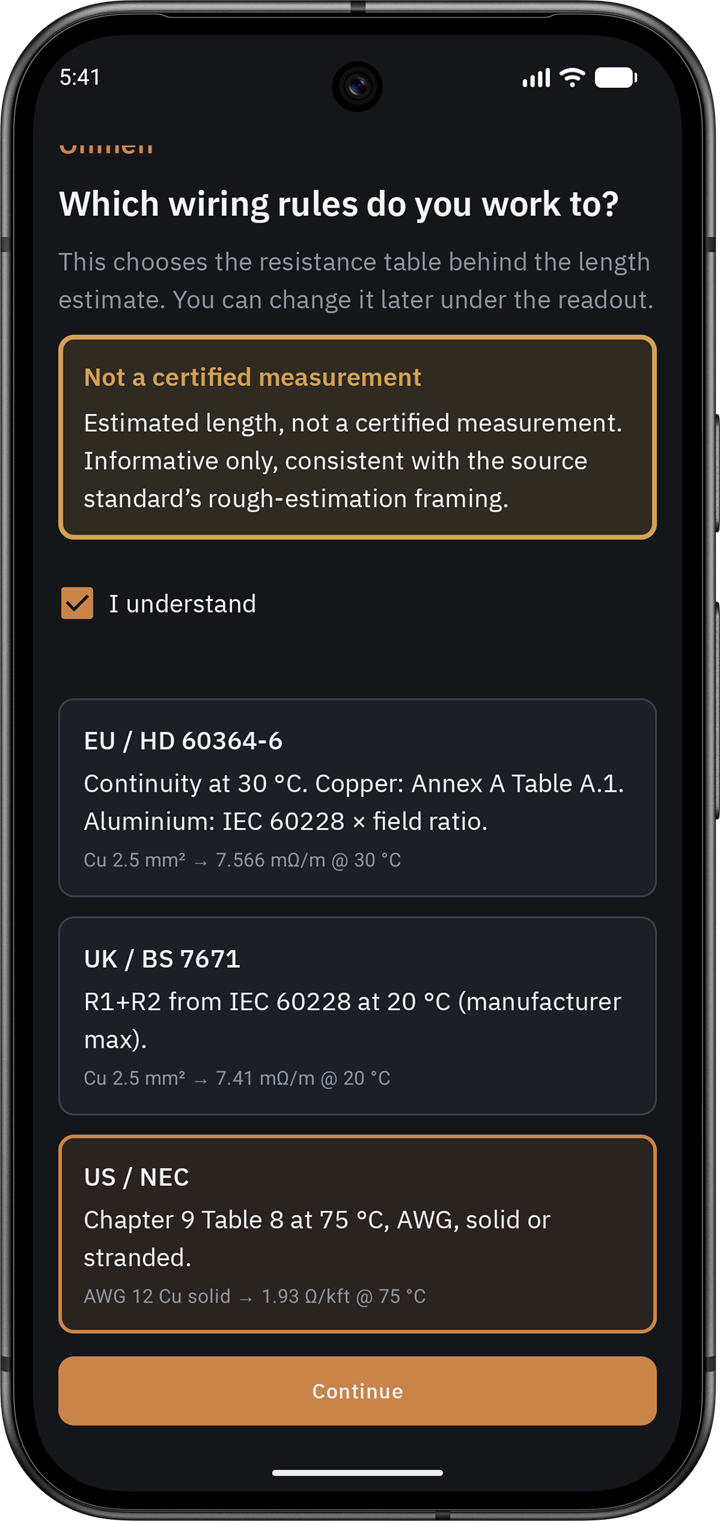
First run screen asking which wiring rules you work to, listing EU HD 60364-6, UK BS 7671, and US NEC with the resistance each table gives for 2.5 mm² copper.
Standards Pick the wiring rules you work to on first run. That table is the source for every estimate, and you can change it under the readout.
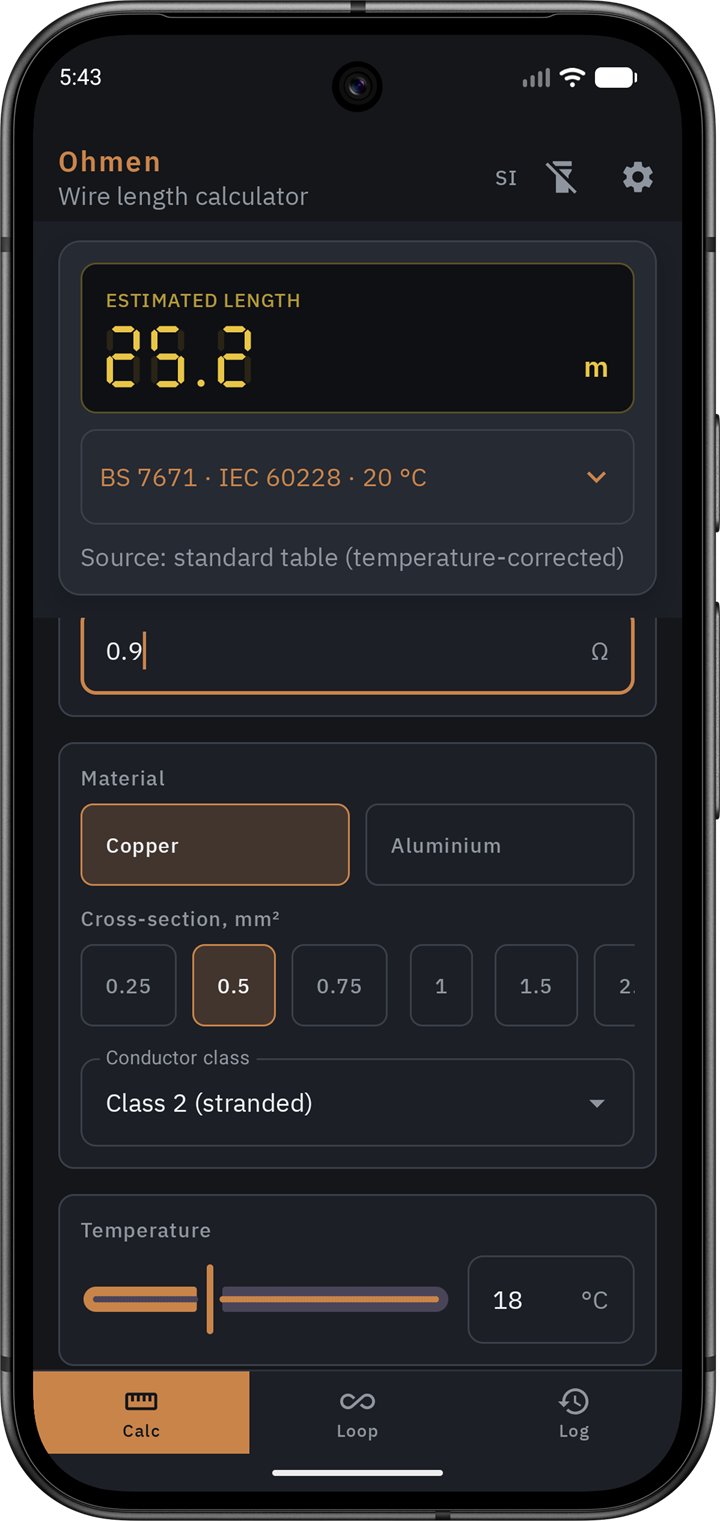
Calculator screen showing an estimated length of 25.2 metres on an amber seven segment readout, above the BS 7671 source table, a resistance field of 0.9 ohms, copper selected, 0.5 mm² cross-section, class 2 stranded, and an 18 degree temperature slider.
Calculator Resistance in, length out. The source table, conductor class, and temperature all sit under the readout where you can check them.
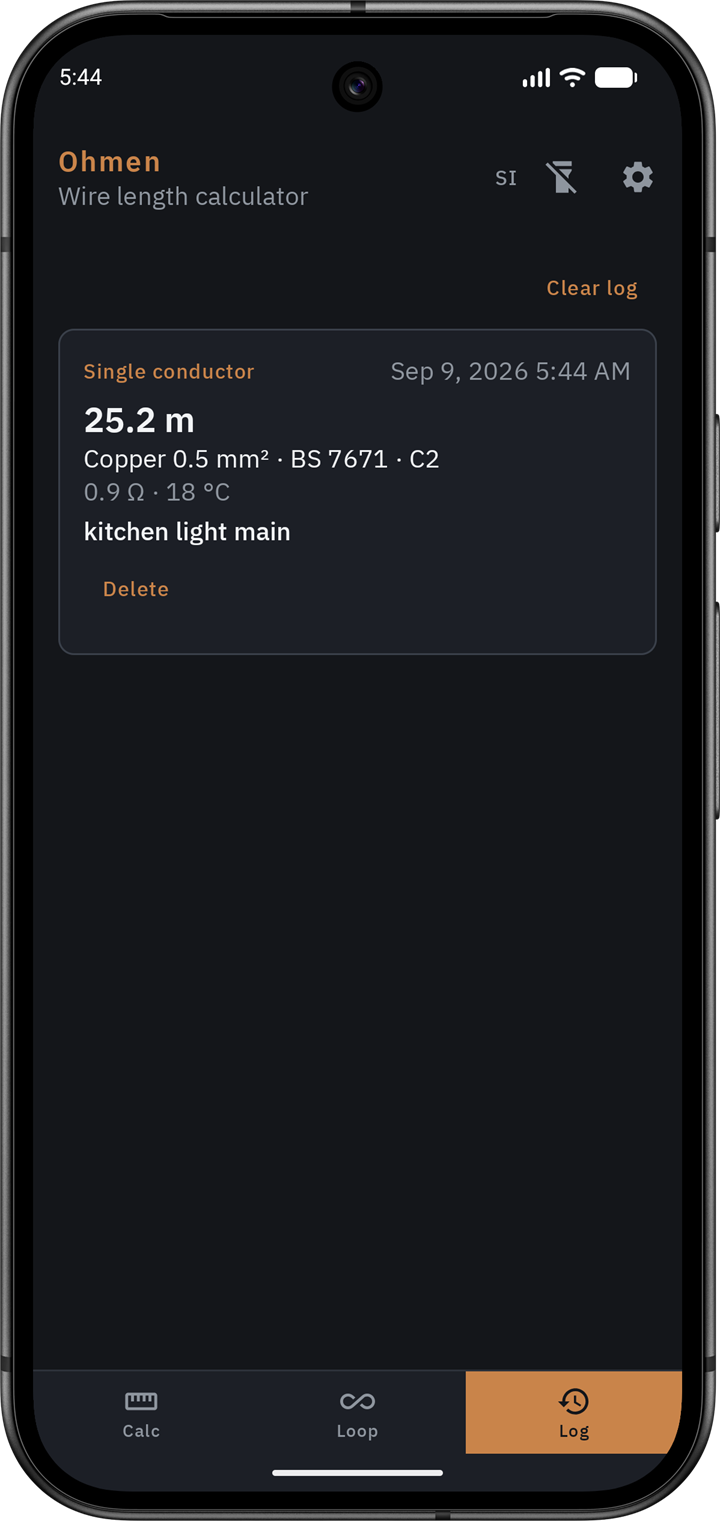
Log screen listing one saved single conductor estimate of 25.2 metres for copper 0.5 mm² under BS 7671 class 2, measured at 0.9 ohms and 18 degrees, tagged kitchen light main.
Log Save a reading against a tag you type, such as kitchen light main. It keeps the conditions with it so the number still means something next week.

Modes

Three screens, one job.

Calculator

Resistance to length

Type the resistance you measured, pick the conductor, and read the length. The readout updates as you type, so you can watch the number settle instead of clearing the field and starting again.

  • Single conductor
  • Temperature correction
  • Live multimeter readout

Loop

Loop to one way run

Measure a two conductor loop and get the one way cable length. Size the protective conductor from the IEC and VDE tables or set it yourself, and subtract your test leads under Advanced.

  • Two conductor loop
  • PE sizing from tables
  • Test lead compensation

Log

Estimates you can keep

Save an estimate with a job or location tag that you type yourself. The history stays in the app on your device. There is no GPS and nothing is uploaded anywhere.

  • Typed job tags
  • Local history
  • No location hardware

Units

Works the way your region does.

Calculations stay in SI internally. The picker changes what you read and type.
System Length Cross section Temperature
SI metricmmm²°C
USftAWG°F
CanadamAWG°C

Privacy

Nothing to send, so nothing is sent.

Ohmen has no network client. The permissions that would let an app phone home, follow you around a site, or read your files are simply not in the manifest.

The job tag on a saved estimate is text you type, such as Panel A. The app never reads GPS or any other location hardware.

Read the full privacy policy

  • INTERNET Not required
  • ACCESS_FINE_LOCATION Not required
  • ACCESS_COARSE_LOCATION Not required
  • READ_EXTERNAL_STORAGE Not required
  • CAMERA Not required